


What UV Label Printer Proofing Actually Tests — And Why Buyers Get It Wrong
Proofing a UV label printer before committing to a production order sounds straightforward. In practice, most buyers walk away from a proof run having tested the wrong things — and they don’t realize it until a full-scale run exposes the gaps.
The most common mistake is evaluating a proof purely on appearance. Color vibrancy, sharpness, gloss finish — these matter, but they represent only one dimension of print performance. UM high resolution UV printer can produce a visually striking proof under controlled conditions that degrades badly once labels hit a cold storage environment, a curved container surface, or a high-friction packaging line. What looks like a pass in a sample room isn’t always a pass in the field.
What a proof should actually be testing:
- Ink adhesion under the specific substrate and surface treatment used in production — not a generic test material
- Cure depth and consistency, particularly on thicker ink layers or white underprint builds
- Edge definition at small text sizes and fine line work, which exposes resolution limits the eye misses on larger graphics
- Color accuracy against a supplied reference profile, not just a visual approximation
- Durability under the end-use conditions relevant to the buyer’s application — chemical exposure, moisture, UV light, abrasion
The substrate variable is where buyers lose the most ground. A UV label printer calibrated for one face stock will behave differently on a matte polypropylene versus a textured paper label. Requesting a proof on the actual production substrate — not a supplier’s default test material — is non-negotiable for any serious procurement decision.
Suppliers who understand commercial-scale production, including those coordinating OEM specifications for international buyers, will typically offer structured proof approval workflows rather than a single sample sign-off. That process discipline matters. It signals that the supplier is thinking about repeatability, not just the impression a first sample makes.
The proof stage is also the right moment to stress-test the supplier’s communication loop — turnaround on revision requests, transparency about what caused a deviation, willingness to document parameters for repeat orders. Those behaviors are harder to evaluate later.
Fine Text and White Ink Checks Every High Resolution UV Printer Proof Must Pass
Fine text and white ink are where UV label printer output either earns commercial confidence or quietly fails it. These two elements expose resolution limits, ink layering accuracy, and dot placement consistency in ways that solid color blocks simply cannot — which is exactly why they belong at the center of any structured proof review.
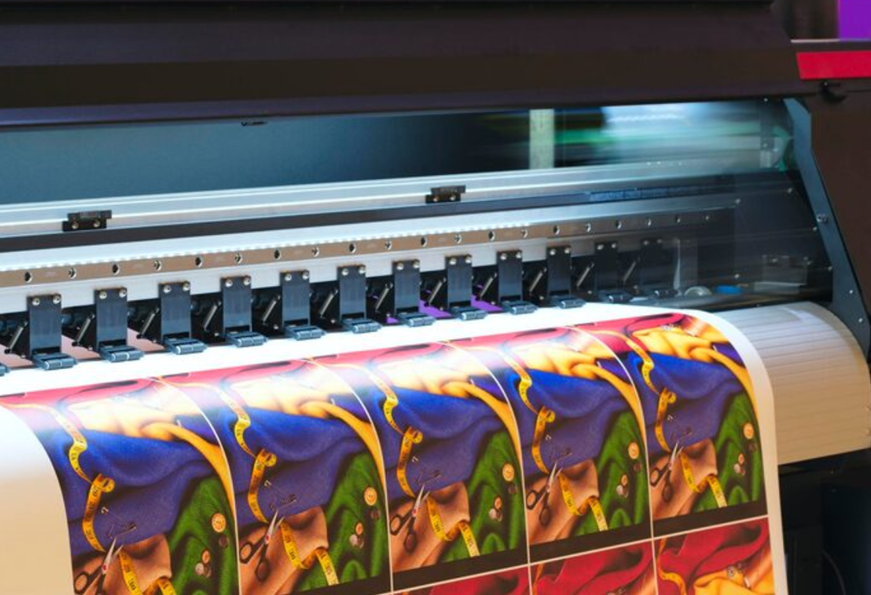
For fine text, the threshold most procurement teams should apply is legibility at 4–6 point type without edge bleed or fill collapse. Serif fonts at small sizes are the harder test — the thin strokes either hold clean or they don’t. If a supplier’s high resolution UV printer is running at its rated optical resolution, hairline strokes should remain distinct and counter spaces (the enclosed areas inside letters like “e” or “um”) should stay open. Any smearing, bridging between strokes, or visible pixelation at those sizes signals a calibration or ink-drop-size problem that will compound across a full production run.
- Test fine text in both positive (dark ink on light substrate) and reverse (light substrate showing through dark flood coat) orientations — failure modes differ between the two.
- Request text printed at minimum production size, not just at comfortable display sizes that flatter the equipment.
- Check text printed over a gradient or multi-layer background, not just on a clean white base — layer interaction is where edge definition degrades most.
- Confirm that the supplier documents the print resolution and pass count used, so those parameters carry forward to repeat orders.
White ink checks are a separate discipline entirely. UV label printer output that relies on white as an opacity base layer — common in clear and metallic substrate work — must show consistent coverage without streaking, pinholes, or density variation across the label field. A single pass of white rarely achieves full opacity; the proof should reflect the actual production pass count, not an inflated sample.
Suppliers coordinating OEM specifications for international buyers, as SINOTEC does across its digital product categories, typically build these ink-layer parameters into documented proof approval records — because white ink inconsistency is one of the fastest ways a repeat order diverges from the approved sample. That documentation is the proof’s real deliverable, not just the physical sheet itself.
Varnish Layers, Abrasion Resistance, and the Durability Standards That Separate Reliable Suppliers
Varnish application is where a lot of UV label printer output either holds up under real-world conditions or quietly fails over time. The varnish layer — whether flood-coated or spot-applied — isn’t decorative finishing. It’s a functional barrier against abrasion, moisture ingress, and UV degradation in the field. Procurement teams that treat varnish spec as a secondary detail tend to discover its importance only after labels start delaminating on warehouse shelving or fading in outdoor exposure.

What actually matters at the supplier evaluation stage is whether the varnish adhesion is tested against the substrate combination the buyer intends to use — not a generic polyester or paper stock the supplier has optimized internally. A high resolution UV printer running gloss varnish over a flexible polypropylene label behaves differently than the same machine running over a rigid vinyl. The cure profile, the layer thickness, and the adhesion bond all shift. Suppliers who document substrate-specific varnish performance in their technical data sheets are demonstrating something real; those who offer a single generalized durability claim are not.
Abrasion resistance standards worth referencing in supplier conversations include the Taber abrasion method and cross-hatch adhesion testing — both of which give procurement teams a quantifiable benchmark rather than a subjective assessment. Ask specifically whether the supplier’s test results reflect pre-cure or post-cure conditions, because the gap between those two states can be significant depending on the UV lamp intensity and conveyor speed used in production.
- Confirm whether varnish testing is conducted on the actual substrate specified for your order, not a standard test material
- Request post-cure abrasion data, not pre-cure figures
- Clarify whether spot varnish and flood varnish are tested separately, as adhesion behavior differs
- Ask if the supplier can provide batch-level varnish consistency records across production runs
Suppliers coordinating OEM and custom-specification orders — the kind of structured supply chain work that organizations like SINOTEC handle across export-oriented digital product categories — typically maintain production records that capture varnish pass parameters alongside ink-layer documentation. That continuity between approved sample and repeat production is where durability standards either get enforced or quietly erode.
How to Build a Pre-Production UV Label Printer Proofing Checklist Your Procurement Team Can Standardize
Standardizing a pre-production proofing checklist isn’t just administrative housekeeping — it’s the mechanism that turns a one-time approved sample into a repeatable production benchmark. For procurement teams managing multiple SKUs or sourcing across different suppliers, a structured checklist removes the ambiguity that tends to surface when production scales or personnel changes.
The checklist should be built around three distinct phases: substrate verification, print parameter documentation, and post-cure sign-off. Each phase needs a responsible party assigned before the proof is even submitted.
- Confirm substrate lot matches the material specified in the approved artwork brief — not a closest equivalent
- Record the UV label printer model and firmware version used for the proof run
- Document ink layer sequence, white ink opacity settings, and varnish type (spot or flood) used in the proof
- Capture resolution output settings — particularly relevant when working with a high resolution UV printer capable of variable dot configurations
- Log cure lamp intensity and belt speed at time of proofing, as both affect adhesion and color density
- Attach post-cure test results: abrasion pass/fail, adhesion tape test result, and chemical resistance outcome if applicable
- Include a color measurement report — Delta E values against the approved color profile, not a visual match only
- Obtain sign-off from both the supplier’s quality contact and your internal procurement or quality lead before production release
The checklist itself is only half the equation. Where procurement teams lose ground is in version control — running production against an outdated proof document because the updated file wasn’t distributed across the supply chain. Any checklist worth standardizing needs a revision date field and a clear protocol for superseding prior approvals.
Suppliers structured for export-oriented order fulfillment — the kind of coordinated OEM workflow that organizations like SINOTEC operate across digital product categories — typically maintain proof documentation as part of their production file, not as a standalone artifact. That distinction matters: when a repeat order comes in six months later, the proof parameters need to be retrievable and binding, not reconstructed from memory or email threads.
Build the checklist once, version it carefully, and attach it to every purchase order as a referenced document. That’s how proofing standards survive supplier transitions and production volume changes.
Conclusão
A UV label printer is only as reliable as the workflow built around it — and most procurement headaches trace back to documentation gaps, not the hardware itself.
Get the proofing checklist standardized, version it on every purchase order, and make sure your supplier treats that document as a production file — not a formality that disappears after the first run. Suppliers who handle repeat export orders properly already do this. If yours doesn’t, that’s worth knowing before the next order lands.
The machine matters. The paper trail matters more.
Frequently Asked Questions
P: What is a UV label printer and how is it different from a standard label printer?
UM: A UV label printer cures ink instantly using ultraviolet light rather than heat or air-drying — which means sharper edges, faster throughput, and prints that sit on top of the substrate rather than soaking into it. That last point matters more than most buyers realize: because the ink doesn’t absorb, it holds up against moisture, chemicals, and abrasion far better than dye or solvent alternatives. The trade-off is upfront cost and the need for UV-compatible media.
P: What types of materials can a UV label printer print on?
UM: Most UV label printers handle a wide range — coated paper, poliéster, polypropylene, vinil, and even rigid substrates like acrylic or metal sheets on flatbed models. The key variable isn’t the printer, it’s the primer or coating on the material: uncoated or highly absorbent surfaces often need a primer layer first or the ink won’t adhere properly. Always request a test print on your actual substrate before committing to a full production run.
P: How much does a UV label printer typically cost?
UM: Entry-level desktop UV label printers can start in the low thousands, while mid-range roll-to-roll systems sit in the range of tens of thousands — and industrial flatbed units can push well beyond that depending on print width, resolution, and automation features. Ink and lamp replacement costs add up faster than most buyers budget for, so factor in total cost of ownership, not just the sticker price. Suppliers offering OEM configurations can sometimes close that gap for high-volume buyers.
P: Why do UV label printer colors sometimes look different in production than on the proof?
UM: Color shift between proof and production is almost always a calibration or media mismatch issue — the ICC profile used during proofing doesn’t match the substrate being run in production. UV inks also tend to read differently under different lighting conditions (a phenomenon called metamerism), so a color that looks spot-on under studio lighting can shift noticeably under warehouse fluorescents. A standardized proofing checklist tied to the purchase order — specifying media, resolution, and lighting conditions — is the most reliable way to catch this before it becomes a costly reprint.
P: How long do UV-printed labels last compared to other label types?
UM: Outdoor durability for UV label prints typically ranges from three to five years depending on UV exposure, lamination, and the specific ink set used — unlaminated prints in direct sunlight will degrade faster. Indoors and away from harsh chemicals, UV labels often outlast the product they’re applied to. That longevity is one of the main reasons UV label printers dominate in industrial, chemical, and food-grade packaging applications.
P: Can a UV label printer handle white ink and specialty finishes?
UM: Most professional UV label printers support white ink as a dedicated channel — used either as an underbase on transparent media or as a top coat for a frosted effect. Varnish channels (gloss or matte spot coating) are also common on mid-range and above models, and some systems support raised texture effects by layering multiple varnish passes. These capabilities vary significantly by model, so confirm the ink channel configuration before purchasing if specialty finishes are part of your product spec.
P: Is a UV label printer worth it for short-run or on-demand label production?
UM: For short runs — think product launches, regional SKU variations, or compliance labels that change frequently — a UV label printer removes the minimum order constraints that come with traditional print suppliers. There’s no plate cost, no setup fee per design, and changeovers between jobs can happen in minutes. The economics flip if volume is consistently high enough to justify offset or flexo; but for buyers who need agility over raw cost-per-unit, UV makes a strong case.
P: How do I know if a UV label printer supplier can handle custom specifications for export orders?
UM: The clearest signal is whether the supplier treats your proofing checklist and technical spec sheet as production documents — not background reading. Suppliers experienced with export fulfillment, particularly those handling OEM or ODM configurations, typically have documented QC processes that version-control specs alongside purchase orders. If a supplier can’t tell you exactly how your spec document flows through their production chain, that’s a gap worth addressing before you place the first order.